Train them.Certify them.Remind them.Simple.
Add the course, add the people, press one button, done. APEXi Certify automatically reminds them for you.
Set up for free, no card or commitment required. Cancel anytime.
- Own certificates
- Awarding organisations
- Renewal reminders
Certificate of training
Sarah Thompson
has completed Fire Marshal
How it works
Three steps. Then it's done.
- 1
Add a course
Create the course, the date and, if you like, add the venue and the client it was for.
- 2
Add the people
Type them in, paste a list, or fully customisable import of your Excel or CSV file.
- 3
Press Send
Automatically email certificates to each candidate, the client, or both. No certificate of your own? Press Register for just reminders instead.
Awarding organisations
Works with awarding organisation courses too.
The only difference is one button. For your own courses, press Send certificates. When an awarding organisation issues the certificates, press Register for reminders instead.
No certificatePay less
Their certificates, kept in Certify
Upload the certificates the awarding organisation sends you and store them with the course.
Reminders still go out
Everyone on the course is reminded before their certificate runs out, so they come back to you.
Pay less
Registering someone for reminders costs half as much as sending a certificate.
Flexible billing
Pricing that works with you, not against you.
- Our Flexible plan adapts to your monthly usage, open and fair billing every month.
- Sent nothing this month? Pay nothing.
- One certificate over? Pay for that one, not a bigger plan.
- Prefer fixed plans? Monthly and annual plans available.
Special offer: 12 months for the price of 10.
Flexible plan calculator
Your bill on Flexible
£0.00
A month with no certificates sent, so there is nothing to pay.
Certificates
Our Certificate Designer
Design your own certificates in our built-in certificate designer, on your own background, with your logo. Press Send certificates and everyone gets theirs by email, in your design.
- Unlimited certificate designs, one for every course
- A QR code on every certificate, so anyone can check it is genuine
- Fully branded emails: certificates and reminders go out with your logo and branding
- Correct and reissue a certificate whenever you need to
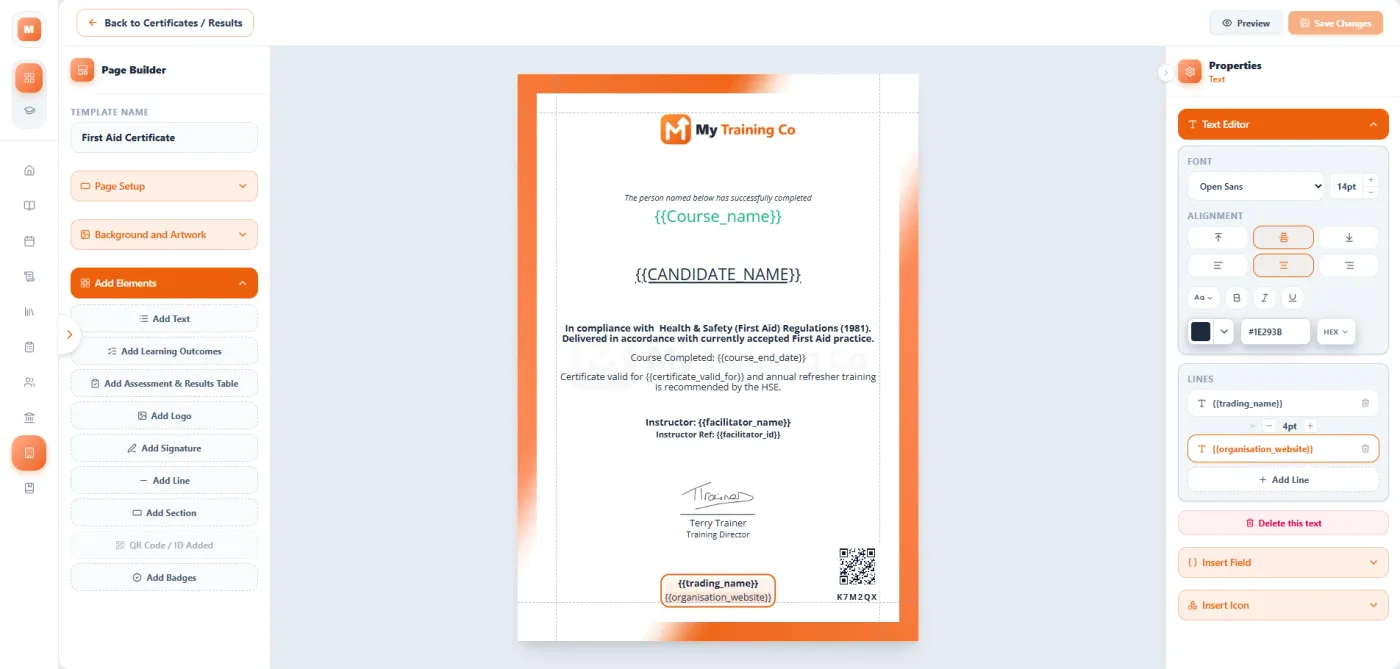
UnlimitedDesigns
What they get
A certificate anyone can check.
By email
A link to their own certificate page, with the PDF to keep.
Checked in seconds
The QR code and certificate number open a page that shows whether it is genuine.
No email address?
Download and print their certificates yourself directly from Certify.
Renewal reminders
They come back before it runs out.
Set how long each course’s certificate lasts, in months or years, or with no expiry at all. APEXi Certify sends each person two reminders before theirs runs out. You choose how far ahead.
Trained a client’s staff? Their contact gets one summary of everyone who is due.
First reminder
3 months before, unless you choose otherwise.
Final reminder
7 days before, unless you choose otherwise.
Your files
All your course paperwork in one place.
Every course date has its own uploads, so the paperwork lives with the course it belongs to, not in a folder somewhere else.
Registers and sign-in sheets
Upload the signed register the day you run the course.
Photos and documents
Photos of the day, and any other documents for the course.
Certificates from elsewhere
The awarding organisation’s certificates, kept apart from your uploads.
 APEXi CertifyAPEXi Certify
Built for simplicity.
Certificate creation, automated issuing and reminders, all in one place.

Complete automation, for very little extra.
For completely automated certificate and course management, bookings and course admin. Want to change? Simply click in the app and everything follows you.
About APEXi FlowYour data
Yours to take with you.
Export everything you have put in, at any time. If you ever close your account, there is a notice period and time to change your mind before anything is deleted.
Send your first certificates.
Set up your account and design your certificate before you choose a plan.